Sparkle TV: Android-focused IPTV player with TV-style recording
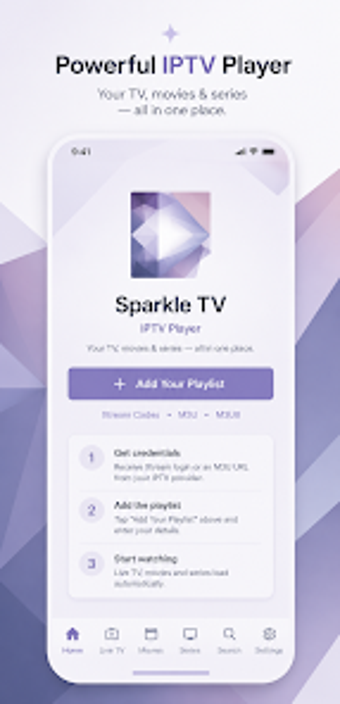
Sparkle TV - IPTV Player, developed by AERONOXA, is a multimedia player for organizing and viewing user-provided IPTV feeds. It plays live TV and VOD from external providers, presenting content in a cable-like interface with TV navigation. The app highlights playlist compatibility, metadata-driven VOD and series organization, and parental controls. It targets cord-cutters and IPTV enthusiasts who want a living-room experience on their devices with remote-driven navigation and playlist management.
Unlock your creativity with Adobe Stock
Get 10 images or 1 video with a free trial
What is Sparkle TV used for?
The app acts as a front end for IPTV subscriptions, letting users browse, watch, and catalogue live channels and on-demand series supplied by their provider. It presents program information and organized categories so viewers can treat IPTV sources like a conventional set-top box. The interface aims for remote control operation, making channel browsing, search, and content playback practical from a couch-oriented device.
What playlist and portal formats does it accept?
Compatibility focuses on common IPTV delivery methods: the app accepts several playlist and portal types so users can connect most services without extra tooling. Supported inputs include:
M3U playlists for channel lists and VOD entries
Xtream Codes-style connections for provider accounts
Stalker portals for operator-style delivery
This variety ensures broad provider interoperability on Android devices.
Is the app suited to living-room Android devices?
Installation and device fit emphasize the TV environment. The app is optimized for Android TV and Fire TV use, integrates with device-level Live Channels where supported, and offers theme and layout adjustments for large-screen navigation. Users who need scheduled recordings or pause-and-rewind on live streams gain a playback model comparable to traditional TV, while configured storage is required for recording functions.
A practical choice for couch-oriented IPTV viewers
The app is a practical option for cord-cutters who want a television-style interface on Android devices and prefer to manage their own IPTV subscriptions. Its reliance on user-supplied channel sources and configured storage for recording is the main trade-off; users who require bundled content or a turnkey channel package should look elsewhere. For managing personal IPTV feeds, it delivers a focused, living-room-friendly experience.
Pros
Supports M3U, Xtream Codes and Stalker portal connections
EPG support with metadata for VOD and series organization
DVR and timeshift model for scheduled recording and live pause
Optimized for Android TV and Fire TV, including Live Channels integration
Cons
Requires users to provide their own IPTV service and playlists
Recording needs attached storage and provider support
Advanced features are gated behind an unlocked app tier
Laws concerning the use of this software vary from country to country. We do not encourage or condone the use of this program if it is in violation of these laws. Softonic may receive a referral fee if you click or buy any of the products featured here.